




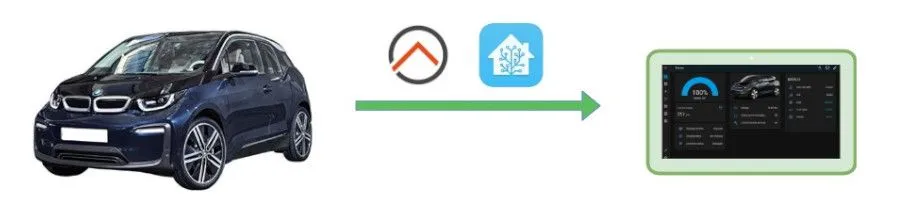
In this article, we will show how to get information about the BMW i3 into a tablet using OpenHAB or Home Assistant. Of course, you can use the MyBMW app, but with the API, we have the opportunity to customize the interface, display simple dashboard with all information on a single page. It is also possible to send supported commands via the API, such as opening, closing, starting the air conditioning/heater, etc., and, most importantly, to integrate these actions with a smart home system.
Examples of usage:
- automatically locking the car at 10:00 PM if we are at home
- voice commands via Alexa - air conditioning, opening/close
- alarm - flashing lights in case of movement in the garden based on security cam or pir, etc.
Hardware
Pi-Home - if you don’t have it, see the section How to
Ideally, a tablet in a central room or Alexa if needed
Software
OpenHAB or Home Assistant
Home Assistant:
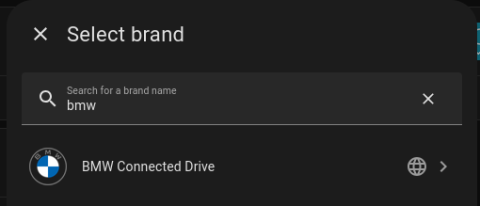
1) Install BMW Connected Drive integration
Settings -> Devices&Services -> Add integration
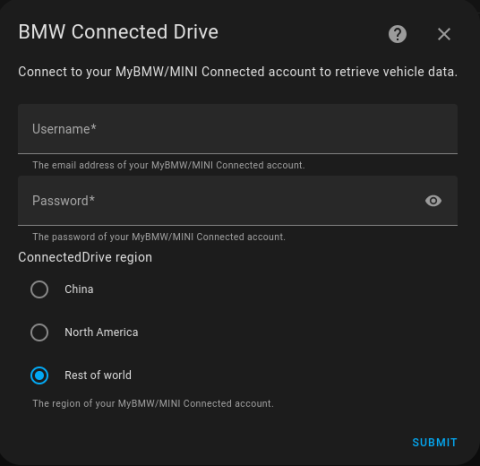
Fill MyBMW credentials. Select Rest of the World
Now, we need current token, open page in new tab:
https://bimmer-connected.readthedocs.io/en/stable/captcha/rest_of_world.html
confirm, you are the human and generate token. Copy and paste to the field in Home Assistant. Save.
Car's name will be "BMW i3".
*You can choose whatever you want but entitites will have diferrent names and template below will not work automatically..
Now you have 24 entities. Several not working for i3. If you want to have dashboard like we have, create a new dashboard in Settings -> Dashboard -> Add dashboard
and click right top corner for edit icon and then to three dots. Select Raw configuration editor
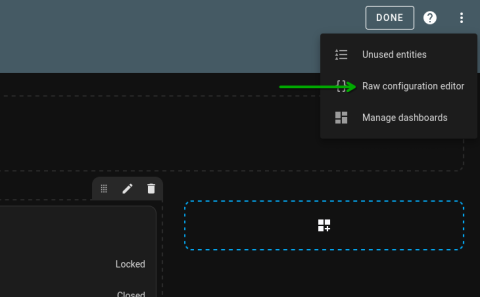
and insert the template yaml code:
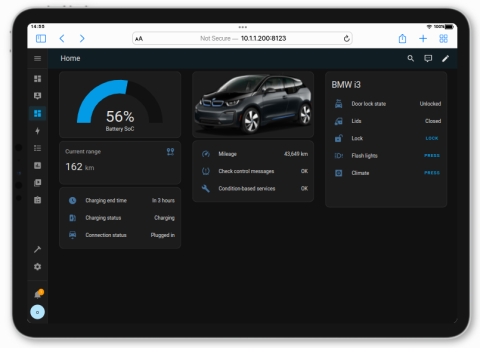
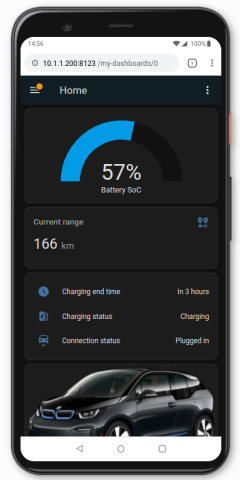
UI should looks like below:
OpenHAB:
1) Install the MyBMW binding in OpenHAB
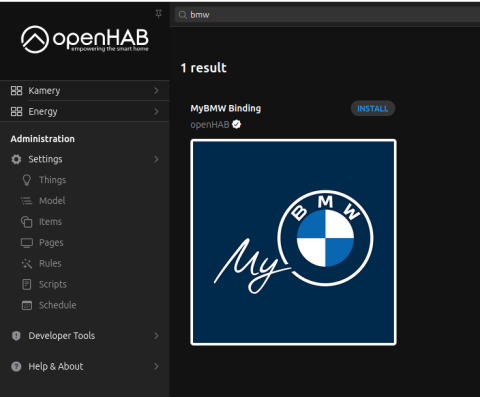
2) Create a bridge Things -> MyBMW -> MyBMWAccount
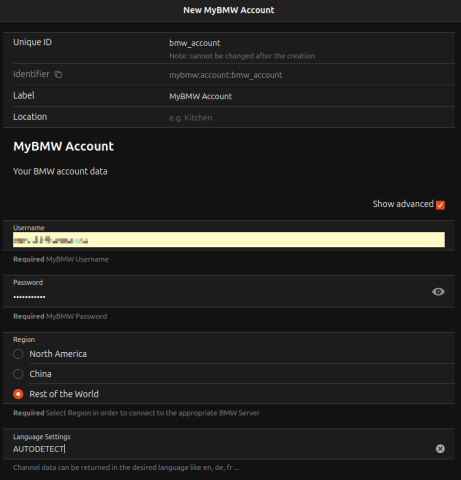 Edit: In the new version, the Account also has a Captcha token. Simply click on the link:
https://bimmer-connected.readthedocs.io/en/stable/captcha/rest_of_world.html
confirm that you are not a robot and generate a token. Copy the token and paste it into the required field in OpenHAB. Save.
The newly added thing BMWAccount should turn green with the status "Online".
3) Add the car through Things -> MyBMW -> Electric vehicle. Don’t forget to enter the real VIN of your vehicle.
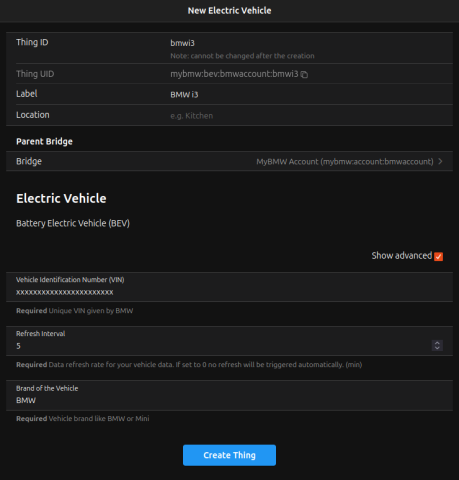
After clicking on the thing of the added car, the status should turn green to "Online." Click on Channels. From them, you can then create Items. Not all Channels are supported; you can try creating all of them and then determine which ones are active. If you are satisfied with what we have in our dashboard, you can also add the Items all at once using the text below (Developer Tools -> Add Items from Textual Definition).
Group    CarBMW                      "BMW"                                (bmw)    ["Equipment"]
Image    BMWRenderedVehicleImage     "BMW Image"                          (CarBMW) ["Point"] { channel="mybmw:bev:bmwaccount:bmwi3:image#png" }
Number   BMWBatteryChargeLevel       "Battery Charge Level [%.0f%%]"      (CarBMW) ["Point"] {channel="mybmw:bev:bmwaccount:bmwi3:range#soc"}
Number   BMWElectricRange            "Electric Range"                     (CarBMW) ["Point"] {channel="mybmw:bev:bmwaccount:bmwi3:range#electric"}
String   BMWPlugConnectionStatus     "Plug Connection Status"             (CarBMW) ["Point"] {channel="mybmw:bev:bmwaccount:bmwi3:status#plug-connection"}
String   BMWChargingStatus           "Charging Status"                    (CarBMW) ["Point"] {channel="mybmw:bev:bmwaccount:bmwi3:status#charge"}
Number   BMWChargingRemainingTime    "Remaining Charging Time [%.0f min]" (CarBMW) ["Point"] {channel="mybmw:bev:bmwaccount:bmwi3:status#charge-remaining"}
String   BMWDoorsStatus              "Overall Door Status"                (CarBMW) ["Point"] {channel="mybmw:bev:bmwaccount:bmwi3:status#doors"}
String   BMWWindowsStatus            "Overall Window Status"              (CarBMW) ["Point"] {channel="mybmw:bev:bmwaccount:bmwi3:status#windows"}
String   BMWDoorsLocked              "Doors Locked"                       (CarBMW) ["Point"] {channel="mybmw:bev:bmwaccount:bmwi3:status#lock"}
Switch   BMWLock                     "Lock"                               (CarBMW)           {expire="1s,command=OFF"}
Switch   BMWUnlock                   "Unlock"                             (CarBMW)           {expire="1s,command=OFF"}
Switch   BMWLights                   "Lights"                             (CarBMW)           {expire="1s,command=OFF"}
Switch   BMWClimateStart             "Climate Start"                      (CarBMW)           {expire="1s,command=OFF"}
Copy the above Items. Be careful with the name of the Channel; if you changed the ID for the BMWAccount or BMWi3 thing, adjust accordingly.
4) Now you can create a Dashboard. In Settings -> Pages, create a new page and arrange the fields. If you want to save time and like our dashboard, go to the Code tab and copy the code below:
 config:
  label: Car
  order: ""
  sidebar: true
blocks:
  - component: oh-block
    config: {}
    slots:
      default:
        - component: oh-grid-cells
          config: {}
          slots:
            default:
              - component: oh-grid-col
                config: {}
                slots:
                  default:
                    - component: oh-label-card
                      config:
                        action: navigate
                        actionPage: page:overview
                        label: Back to Main Page
        - component: oh-grid-row
          config: {}
          slots:
            default: []
  - component: oh-block
    config: {}
    slots:
      default:
        - component: oh-grid-row
          config: {}
          slots:
            default:
              - component: oh-grid-col
                config: {}
                slots:
                  default:
                    - component: oh-gauge-card
                      config:
                        borderColor: "#2196f3"
                        borderWidth: "20"
                        item: BMWBatteryChargeLevel
                        max: 100
                        min: 0
                        size: 200
                        type: semicircle
                        valueFontSize: "30"
                        valueTextColor: "#2196f3"
                        title: Current Battery Status
                        action: analyzer
                        actionAnalyzerItems:
                          - BMWBatteryChargeLevel
              - component: oh-grid-col
                config: {}
                slots:
                  default:
                    - component: oh-image-card
                      config:
                        item: BMWRenderedVehicleImage
              - component: oh-grid-col
                config: {}
                slots:
                  default:
                    - component: oh-list-card
                      config: {}
                      slots:
                        default:
                          - component: oh-label-item
                            config:
                              item: BMWDoorsStatus
                              title: Doors
                          - component: oh-label-item
                            config:
                              item: BMWWindowsStatus
                              title: Windows
                          - component: oh-label-item
                            config:
                              item: BMWDoorsLocked
                              title: Status
                          - component: oh-label-item
                            config:
                              item: BMW_i3_Check_Control
                              title: Errors
                          - component: oh-label-item
                            config:
                              item: BMW_i3_Total_Distance_Driven
                              title: Total Distance Driven
                              action: analyzer
                              actionAnalyzerItems:
                                - BMW_i3_Total_Distance_Driven
                          - component: oh-label-item
                            config:
                              item: BMW_i3_Address
                              title: Current Location
  - component: oh-block
    config: {}
    slots:
      default:
        - component: oh-grid-row
          config: {}
          slots:
            default:
              - component: oh-grid-col
                config: {}
                slots:
                  default:
                    - component: oh-label-card
                      config:
                        item: BMWElectricRange
                        label: =items.BMWElectricRange.displayState
                        title: Current Range
                        trendItem: BMWElectricRange
                        action: analyzer
                        actionAnalyzerItems:
                          - BMWElectricRange
              - component: oh-grid-col
                config: {}
                slots:
                  default:
                    - component: oh-label-card
                      config:
                        action: command
                        actionItem: BMWLock
                        icon: iconify:icon-park-solid:lock
                        iconUseState: false
                        iconSize: 50
                        actionCommand: ON
                        vertical: true
              - component: oh-grid-col
                config: {}
                slots:
                  default:
                    - component: oh-label-card
                      config:
                        action: command
                        actionItem: BMWUnlock
                        icon: iconify:icon-park-solid:unlock
                        iconUseState: false
                        iconSize: 50
                        actionCommand: ON
                        vertical: true
              - component: oh-grid-col
                config: {}
                slots:
                  default:
                    - component: oh-label-card
                      config:
                        action: command
                        actionItem: BMWClimateStart
                        icon: iconify:mingcute:fan-fill
                        iconUseState: false
                        iconSize: 50
                        actionCommand: ON
                        vertical: true
              - component: oh-grid-col
                config: {}
                slots:
                  default:
                    - component: oh-label-card
                      config:
                        action: command
                        actionItem: BMWLights
                        icon: iconify:mdi:car-light-high
                        iconUseState: false
                        iconSize: 50
                        actionCommand: ON
                        vertical: true
        - component: oh-grid-row
          config: {}
          slots:
            default:
              - component: oh-grid-col
                config: {}
                slots:
                  default:
                    - component: oh-label-card
                      config:
                        item: BMWPlugConnectionStatus
                        title: Charger
                        fontSize: 20px
              - component: oh-grid-col
                config: {}
                slots:
                  default:
                    - component: oh-label-card
                      config:
                        title: Charging Status
                        item: BMWChargingStatus
                        fontSize: 20px
              - component: oh-grid-col
                config: {}
                slots:
                  default:
                    - component: widget:widget_remainingchargingtime
                      config: {}
masonry: []
grid: []
canvas: []
Copy the above Items. Be mindful of the Channel names; if you changed the ID for the BMWAccount or BMWi3 thing, adjust them as needed.
Now you can create a Dashboard. In Settings -> Pages, create a new page and arrange the fields. If you want to save time and like our dashboard, switch to the Code tab and copy the following code below:
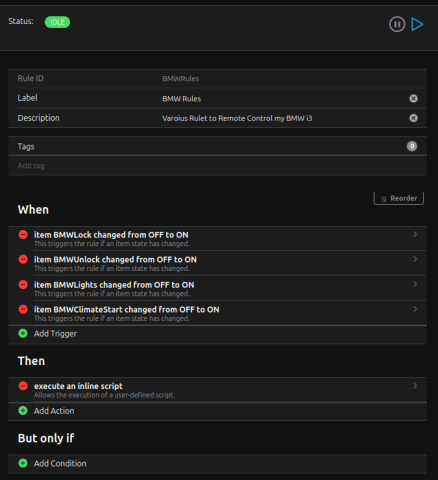
And that's it. It should be functional; if not, feel free to write in the comments. The last thing: to make the buttons for unlocking, locking, flashing, and climate control work, we’ll add a rule that sets the RemoteCommand based on the button pressed. Add a new rule in Rules.
Go to the Code tab and copy the rule's source code.
configuration: {}
triggers:
  - id: "2"
    configuration:
      itemName: BMWLock
      state: ON
      previousState: OFF
    type: core.ItemStateChangeTrigger
  - id: "3"
    configuration:
      itemName: BMWUnlock
      state: ON
      previousState: OFF
    type: core.ItemStateChangeTrigger
  - id: "4"
    configuration:
      itemName: BMWLights
      state: ON
      previousState: OFF
    type: core.ItemStateChangeTrigger
  - id: "8"
    configuration:
      itemName: BMWClimateStart
      state: ON
      previousState: OFF
    type: core.ItemStateChangeTrigger
conditions: []
actions:
  - inputs: {}
    id: "1"
    configuration:
      type: application/vnd.openhab.dsl.rule
      script: "if(BMWLock.state == ON){

        \   sendCommand(BMW_i3_Remote_Command, \"door-lock\")

        \   }

        if(BMWUnlock.state == ON){

        \   sendCommand(BMW_i3_Remote_Command, \"door-unlock\")

        \   }

        if(BMWLights.state == ON){

        \   sendCommand(BMW_i3_Remote_Command, \"light-flash\")

        \   }

        if(BMWClimateStart.state == ON){

        \   sendCommand(BMW_i3_Remote_Command, \"climate-now-start\")

        \   }\

        \  "
    type: script.ScriptAction
It should look something like this:
Done. Test the functionality. Sometimes a command fails, especially if you send multiple commands in quick succession. This is not recommended. In Items, there is also an entry called BMW Service_Execution_State where you can check the processing status of sent commands. Occasionally, you may see an Error 403, but the information still reaches the car. Charge Start/Stop doesn’t work for me, so I haven’t included it. I’d appreciate your experiences and practical use cases in the comments.
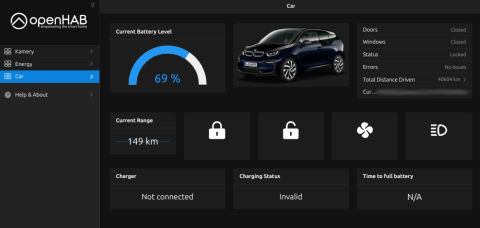
Bonus: For Time to full battery field we are using a special widget which transform minutes to hours and minutes or say N/A if car is not on charger. You can add widget in Developer Tools -> Widgets. Create new and import code below:
uid: widget_remainingchargingtime
tags: []
props:
  parameters:
    - description: A text prop
      label: Prop 1
      name: prop1
      required: false
      type: TEXT
    - context: item
      description: An item to control
      label: Item
      name: item
      required: false
      type: TEXT
  parameterGroups: []
timestamp: Jan 4, 2025, 9:34:49 PM
component: f7-card
config:
  item: DurationInMinutes
  content: '=(items["BMWChargingRemainingTime"].state === "NULL"
    ||  items["BMWChargingRemainingTime"].state === "UNDEF" ? "N/A" :
    Math.floor(items["BMWChargingRemainingTime"].state / 60) + "h " +
    (items["BMWChargingRemainingTime"].state % 60) + "m")'
  title: Time to full battery
  style:
    font-size: 22px
    text-align: center
Comments
Test
Add new comment